













How To Optimize Your Fiber Laser Marking Parameters

Fiber laser marking machines are among the most recent innovations in laser technology. They provide a variety of benefits over CO2 lasers, especially in terms of how to engrave metals. However, getting the results that your machine is capable of requires paying close attention to your fiber laser marking parameters.
The Importance of Optimizing Parameters for Quality Results
When working with any laser cutting, engraving, or marking machine, getting the right parameters is essential. It is especially important when handling a fiber laser engraving machine.
Fiber laser technology uses high-quality laser beams and optical components to achieve a small focal diameter. This small focal diameter improves the fiber laser marker's precision, concentrating the laser energy to enable engraving and marking a wide range of materials.
Without suitable fiber laser parameters, there's a great chance you may lack the precision you need for small, intricate designs. Precision is required for a plethora of things: sports medals, trophies, commemorative plaques, and other similar decorative metal items all need incredible accuracy for their text and details.
As a general warning, there’s also less wiggle room when dealing with a fiber laser marker machine compared to CO2 lasers. While CO2 lasers often deal with organic materials and other soft surfaces that don’t require exceptional precision, the metals and other hard surfaces handled with fiber laser engraving necessitate fine-tuning of your machine.
Key Procedures When Optimizing Laser Marking Parameters

Knowing your machine and the materials you work with is vital when optimizing laser beam parameters. Before starting with any laser marking project, you should familiarize yourself with OMTech laser settings to understand the factors that will affect your results. These key parameters all play essential roles.
Enhance Laser Power Settings
Power is one of the most critical parameters for laser engraving. Your fiber laser marking machine will have a specific maximum power. It can be adjusted to put out any value up to that maximum. The higher the power, the more material your laser will remove with every pass.
There is no one-size-fits-all power solution. Instead, you’ll need the right power level for the specific material you’re using and the depth of your markings. You’ll also have to balance power and the number of passes. Higher power means fewer passes but increases the risk of damaging your piece.
Adjust Marking Speeds for Efficiency
Your laser marking machine moves the laser beam along a predetermined path at a speed. The slower the speed, the longer the laser is in contact with the surface. For a given power setting, this results in a deeper marking. Setting your speed higher means your project will be finished sooner, but you might need more marking quality.
Speed is mainly dependent on materials. Softer metals such as aluminum allow for faster passes. Harder metals such as brass and stainless steel can require significantly reduced speed to make your markings appear clearly. They may also need higher power settings, but you can only compensate so much.
Select the Appropriate Resolution and Frequency
Whenever you start a new project, you should start by determining the appropriate resolution and frequency. The resolution refers to the detail in your design, typically measured in dots per inch (DPI). The resolution determines how smooth your design will look and how small the finest details can be.
The frequency is another important factor. Your fiber laser marking machine doesn’t use a continuous beam, as this could damage both the materials and the equipment. Instead, it sends regular pulses at a set frequency. Choosing the pulse frequency is another essential laser marking parameter.

Choose the Right Resolution for Your Design
Different resolutions have a significant impact on both your final results and the time that your project takes. Fiber lasers can achieve higher resolution than CO2 lasers. Still, many factors remain to consider when choosing the resolution for a given design. Generally, the metals most often used with fiber lasers allow 600 to 1,000 DPI.
A simple design such as a logo or larger text doesn’t require a high resolution. You can achieve beautiful results much more quickly at lower resolutions. However, detailed designs such as intricate graphics or photorealistic marking call for higher resolutions that take more time.
Adjust Frequency Based on Material Properties
A lower frequency means your laser turns on and off less often, delivering more energy with every pulse. Lower frequencies vaporize materials, while higher frequencies are more suited for creating an oxide layer.
Manage Passes, Air Assist, and Z-Offset
Several more important parameters can have a major impact on your results. The number of passes is vital in determining the depth of any marking. More passes mean more depth, although you must balance passes with speed and power.
Air assist provides a steady air stream that removes ablated material during laser engraving. While this is more important when dealing with softer material and deeper cuts, it helps reduce blemishes and charring in metal engraving. Check to see if your air assist is enabled.
Z-offset measures how far the laser’s focal length is from the material’s surface. The laser beam is concentrated at its highest power at the focal point. You typically want the Z-offset to have a focal point between the surface and the intended engraving depth.
Leverage OMTech’s Fiber Laser Machines for Precise Markings
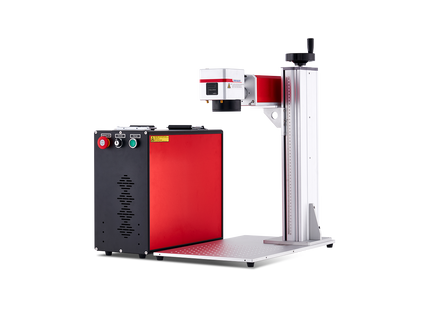
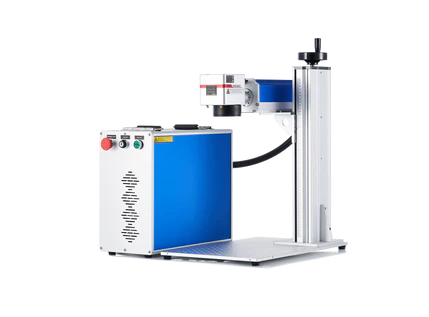
Carefully optimizing fiber laser marking parameters is essential to get the stunning results you want for your next piece. However, the specific equipment you choose is just as important. If you aren’t working with the right tools, no amount of troubleshooting will deliver results. OMTech provides a wide range of laser marking, engraving, and cutting machines. That includes the latest fiber laser machines for exceptional results with a wide variety of materials. You can browse our collection today to find the fiber laser marker machine for any application.
Frequently Asked Questions (FAQ)
Q1: Why are the correct fiber laser marking parameters so important?
Correct parameters ensure you get clean, precise marks on metal or other materials rather than faint or damaged results. They affect depth, clarity, contrast and overall finish.
Q2: What are the key parameters I should adjust on my fiber laser machine?
You should focus on power (how much laser energy is applied), speed (how fast the beam moves), resolution/line spacing (for detail), frequency (pulse rate) and number of passes or loops. Additional factors include air-assist and Z-offset (focal height).
Q3: How do I balance power and speed for different materials?
If the mark is too light, increase power or slow the speed. If it’s too dark, burnt or the surface is damaged, reduce power or speed up. Different metals and plastics respond differently so trial runs are essential.
Q4: What role does frequency and resolution play in fiber laser marking?
Frequency (pulse rate) affects how smooth or deep the engraving is: higher frequencies suit fine detail, lower frequencies suit deeper marks. Resolution and line spacing impact how crisp or grainy the design appears.
Q5: Are there common mistakes when setting up marking parameters?
Yes. Some common errors include skipping test runs, using default settings for all materials, ignoring the focal point (Z-offset), and not adjusting parameters when switching materials. These mistakes reduce quality and waste time.
Q6: How do I know when I should fine-tune parameters for a specific job?
Whenever you switch to a new material, change thickness, or move from a logo to a photo-detailed engraving, you should fine-tune parameters. Also, if you start seeing inconsistent results or slower production, revisit your settings.
Q7: Can I rely on preset parameters, or do I always need to test?
Presets are a helpful starting point but should never be the final setting for each job. Because materials, thickness, coatings and machine condition vary, you’ll always get better results by doing a quick test cut or mark and adjusting accordingly.