














Master Laser Engraving on Curved Objects with OMTech Rotary Attachments
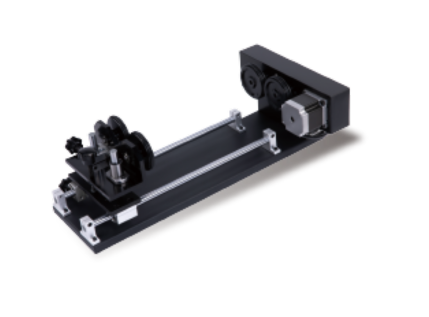
Flat materials are only the beginning of what laser engraving can do. Once you move beyond plaques and panels, a whole new creative world opens up—curved, cylindrical, and even spherical surfaces. From wine bottles and stainless steel drinkware to rounded metal components, OMTech Laser machines make it possible to engrave non-flat objects with confidence and consistency. The key to this flexibility lies in one powerful accessory: the rotary attachment. Designed specifically for engraving round and curved items, it allows your laser to maintain alignment and detail as the object rotates. In this guide, we’ll walk through how curved surface engraving works, why rotary attachments matter, and how to get the best results using OMTech laser technology.

How Laser Engraving Works on Curved Surfaces
Laser engraving used to be limited to flat materials, but modern machines and accessories have changed that entirely. With the help of rotary tools and adjustable focus settings, lasers can now engrave everything from cylindrical glasses to decorative spheres—without distortion.
When engraving curved objects, keep these fundamentals in mind:
-
Adjust Power and Speed Settings
As the surface curves, the distance between the laser head and the material can vary. Fine-tuning power and speed helps maintain consistent engraving depth. -
Design with the Curve in Mind
Artwork should be adapted to wrap naturally around the object, reducing stretching or compression in the final result. -
Test Focus and Angles
Small changes in focus height or laser angle can dramatically improve results, especially on tighter curves or rounded edges.
These adjustments help ensure clean lines and professional-quality engravings, even on challenging shapes.
Why Rotary Attachments Make All the Difference
Trying to engrave a bottle or tumbler without a rotary attachment often leads to uneven results and frustration. A rotary attachment solves this by rotating the object smoothly while the laser engraves, keeping the beam aligned with the surface at all times.
Here’s why rotary attachments are essential for curved engraving:
-
Consistent, Smooth Rotation
The object turns steadily, allowing your design to wrap seamlessly around the surface. -
Ideal for Complex Shapes
Items like spheres, rounded wood pieces, or cylindrical metal parts become much easier to engrave accurately. -
Simplified Focus Adjustments
With the object rotating evenly, maintaining proper laser focus across the curve becomes far more manageable.
Once installed, a rotary attachment transforms curved engraving from a challenge into a routine process.

Setting Up Your OMTech Laser for Curved Engraving
OMTech machines are designed to be user-friendly, and engraving curved objects follows the same straightforward approach. Here’s a simple setup process to get started:
-
Select the Right Object
Choose a clean, evenly shaped item such as a metal tumbler, curved glass, or aluminum bottle. -
Install the Rotary Attachment
Secure the attachment firmly and make sure the object is held tightly to prevent slipping during rotation. -
Prepare Your Artwork
In your laser software, adjust or “wrap” the design so it aligns with the object’s curvature, similar to applying a label around a bottle. -
Fine-Tune Laser Settings
Adjust power, speed, and focus to match the material and curvature, ensuring the laser remains sharp across the surface. -
Start Engraving
Begin the job and let the rotary attachment handle the rotation while the laser delivers a smooth, consistent engraving.
Material-Specific Tips for Better Results
Different materials react differently when engraved on curved surfaces. These tips can help reduce trial and error:
-
Glass (wine glasses, curved trophies)
Glass is heat-sensitive, so lower power and slower speeds work best. Avoid lingering too long in one spot. -
Bottles and Tumblers
Make sure the item fits snugly in the rotary attachment. Consistent rotation speed helps achieve clean wraparound designs. -
Curved Metal Surfaces
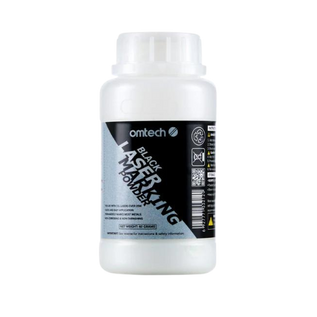
Metal may reflect the laser beam. Using a marking spray or coating can improve contrast, and careful focus adjustment is crucial. -
Spherical Objects
Always run test engravings first. This ensures your design reaches all areas evenly without losing detail.
Each material has its own learning curve, but once you understand its behavior, your creative options expand dramatically.

Improving Results with Focus Curvature Adjustments
Maintaining proper laser focus is critical when engraving curved surfaces. OMTech’s focus adjustment features help compensate for changes in distance across the curve.
-
Maintain Consistent Beam Intensity
Adjusting focus as the surface curves ensures even engraving depth from start to finish. -
Run Small Test Passes
Testing your settings before engraving the final piece can save time and prevent costly mistakes—especially on high-value materials.
These small refinements can make a noticeable difference in engraving clarity and overall quality.
Curve with Confidence Using OMTech Laser
Engraving curved surfaces doesn’t have to feel complicated. With OMTech’s intuitive controls, reliable rotary attachments, and flexible focus adjustments, even complex shapes become accessible. Whether you’re customizing drinkware, creating personalized gifts, or developing prototypes with curved components, OMTech helps you bring your ideas full circle—literally.
FAQs: Curved Surface Laser Engraving Explained
Q: Is a rotary attachment necessary for engraving curved objects?
A: Yes. A rotary attachment allows the object to rotate evenly, ensuring consistent engraving depth and detail across curved surfaces like bottles and spheres.
Q: How can I achieve clean, distortion-free results?
A: Secure the object firmly, adjust power, speed, and focus settings, and design artwork that conforms to the object’s curvature.
Q: Can OMTech lasers engrave different curved materials?
A: Absolutely. OMTech machines can engrave curved glass, metal, plastic, and more—simply adjust your settings based on the material and shape.